Cork for screenwriters
A digital corkboard for screenwriters — beat boards, scene cards, and TV season planning in the index card format that every writer is familiar with.
The corkboard full of 3x5 cards, one beat or scene per card, is how writers' rooms have broken stories for decades, and it works because index cards are small enough to force a decision and loose enough to move. But it's not very practical for how we write today.
The problem is that a wall of cards lives in one room. You can't carry it on the train, you can't search it, and when you pull everything down onto the floor in frustration, it's hard to pick up the pieces. When a script grows past a few dozen cards, "I know I moved that scene somewhere" becomes a daily emotion.
Cork is that wall, digitized without losing the feel. Uniform cards you can drag anywhere, pile into stacks, or line up in named columns — the same gestures you already do with pushpins, just minus the pushpins.
Build a beat board
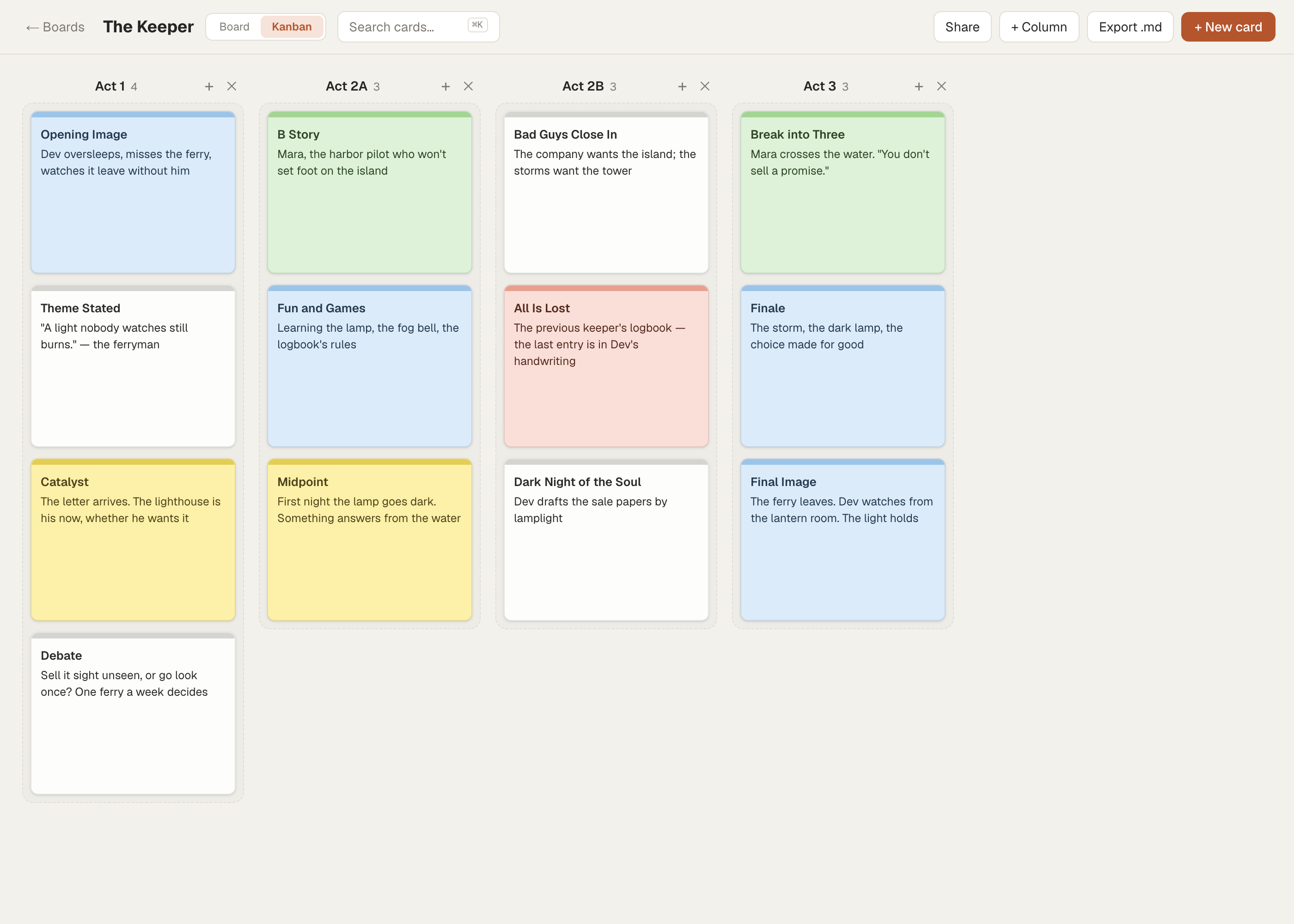
Most screenwriters plan against a beat structure before they plan scenes — the fifteen beats of Save the Cat, the three-act paradigm from Syd Field, or your own. Cork's kanban view fits this cleanly: make one column per act or per structural section, and drop a card in for each beat.
A Save the Cat board might run left to right with columns for Act 1, Act 2A, Act 2B, and Act 3, with cards like:
- Opening Image — Dev oversleeps, misses the ferry, watches it leave without him.
- Catalyst — The letter arrives. The lighthouse is his now, whether he wants it.
- Midpoint — First night the lamp goes dark. Something answers from the water.
- All Is Lost — He finds the previous keeper's logbook. The last entry is his own handwriting.
Give the columns whatever names your method uses — Cork doesn't care whether you break story by beats, sequences, or a system you invented six Red Bulls deep at 2am. Every writer's system is different and Cork is flexible enough to adapt to yours. You can reorder columns by dragging their headers when the structure shifts.
Lay out a feature scene by scene
Once the beats hold, switch to the free-form corkboard view and go one card per scene. Spread scenes across the board, drag them into sequence, and use Cork's card colors to encode something at a glance — color by act, or by story line so you can see the A-story, B-story, and C-story braiding down the board.
A scene card holds more than a slugline. Put the scene heading in the title and the beat underneath:
INT. LIGHTHOUSE — NIGHT
Dev reads the logbook aloud. Mara stops him halfway. She's heard these words before. Turn: she knew the old keeper.
Link scenes to the people and threads inside them with [[wiki-links]] — type [[Mara Vane]] in a scene card and Cork connects it to Mara's character card, with backlinks so you can open Mara and see every scene she's in. It's how you answer "wait, when did we last see her?" without scrolling the whole board.
Plan a TV season
The card system familiar to any television writer's room maps directly onto kanban. Make one column per episode — 101, 102, 103 — and let each card be a beat or a scene inside that episode. Drag a beat from 104 into 103 when the episode's running short. Drop a card between two others to slot it in; neighbors shift to make room.
Keep a separate board per season, or a single board with a column for the arc that runs across all of them. Use tags to track major story arcs — tag every card that touches the missing-brother subplot with #brother, then filter the board down to just those cards to check the thread holds across the season.
The rewrite shuffle
Rewriting on paper means retyping cards or crossing things out. On Cork, restructuring is dragging. Move a scene three slots earlier and everything downstream reflows; you never retype a word to reorder.
For the scenes you've cut but can't quite bury, make a stack — drop cards onto each other's centers and they pile up with a count badge. A "Maybe" stack in the corner of the board holds every darling you're not ready to kill. When a rewrite calls one back, fan the stack out and drag it into place.
When the plan is done and you're moving to script, export the board to markdown in one click — an outline you can paste into wherever you actually write the pages.
What Cork is not
Cork is for breaking and organizing a story, not writing it. It is not a screenwriting editor — there's no Fountain or Final Draft mode, no automatic sluglines, no page counting, and no format-as-you-type. It doesn't import from Final Draft or export to it; export is plain markdown. And it doesn't do real-time writers'-room collaboration — you can share a read-only link to a board, but two people can't drag cards on the same board at once.
Think of Cork as the wall you plan on, then move to your screenwriting software to draft. Your words are yours. Export whenever you want them out.
FAQ
Is Cork a replacement for Final Draft or Fountain?
No. Cork is a planning and outlining tool for breaking your story on a corkboard, it has no script editor, no screenplay formatting, and no page counting. You plan in Cork, then write the actual pages in your screenwriting software.
Can I import my Final Draft or Scrivener files?
No. Cork does not import from Final Draft, Scrivener, or any script format. You build your beat and scene cards in Cork directly, and export to markdown when you're ready to move on.
Does Cork support the Save the Cat or Syd Field structure?
Cork doesn't lock you into any method, which means every method fits. Make a kanban column for each beat or act — Save the Cat's fifteen beats, Field's three-act paradigm, or your own — and drop a card in for each one.
Can my writing partner and I work on the same board together?
Not at the same time. Cork has no real-time collaboration, but you can share a read-only link so a partner or producer can see the board, and you can export it to markdown to hand off.
How do I get my outline out of Cork?
Any board exports to a single markdown file with one click, preserving card titles, content, tags, and column order. Paste it into your script software or a document to keep writing.
Does Cork work offline or on my phone?
Cork installs as an app on desktop and mobile and works well on a phone screen, but it needs a connection — there's no offline editing. The install gives you an app icon and a full-window view, not an offline mode.
Ready to pin your first scene? The free plan gives you 3 boards and requires no credit card to start — enough to break down a whole feature before you decide anything.