Cork for students and researchers
A corkboard for thesis and dissertation planning — map arguments card by card, build a literature-review board, and reshape chapters by dragging.
Face it: your thesis is probably too big to hold in your head all at once. The trouble with the usual tools is that a linear outline hides exactly the problems you most need to see. Everything looks fine stacked in a Word document with indented bullets, right up until you notice, in chapter four, that your central claim contradicts something you argued in chapter two.
Cork fixes this because its cards are movable and you can see them all at once. One claim per card, one source per card, spread across a board — and the gaps, repetitions, and non-sequiturs that a linear outline politely conceals become visible the moment they're sitting next to each other.
When a project grows past a few dozen cards, "I know I wrote this down somewhere" becomes a real blocker. Cork gives your thesis a surface big enough to hold it, and a search across every board so nothing you noted goes missing.
Map your argument, one claim per card
Write each load-bearing claim of your thesis on its own card, then lay them left to right in the order you plan to make them. Now read across. Does the argument actually flow, or does step three quietly assume something you don't establish until step six?
An argument board for a thesis might hold cards like:
- Claim 1 — Municipal archives systematically under-recorded informal labor.
- Claim 2 — Which means wage series built from them understate women's participation. (fix — reword, this depends on Claim 4)
- Claim 3 — Oral histories recover what the ledgers omit.
- Counterargument — "Oral testimony is unreliable at fifty years' distance." Address in ch. 3.
Drag the counterargument card to sit right where a reader would raise it. Move Claim 2 after Claim 4 when you realize it depends on it. The corkboard view lets you spread claims out and reorder them by dragging, so restructuring an argument is a matter of moving cards, not rewriting an outline.
Build a literature-review board
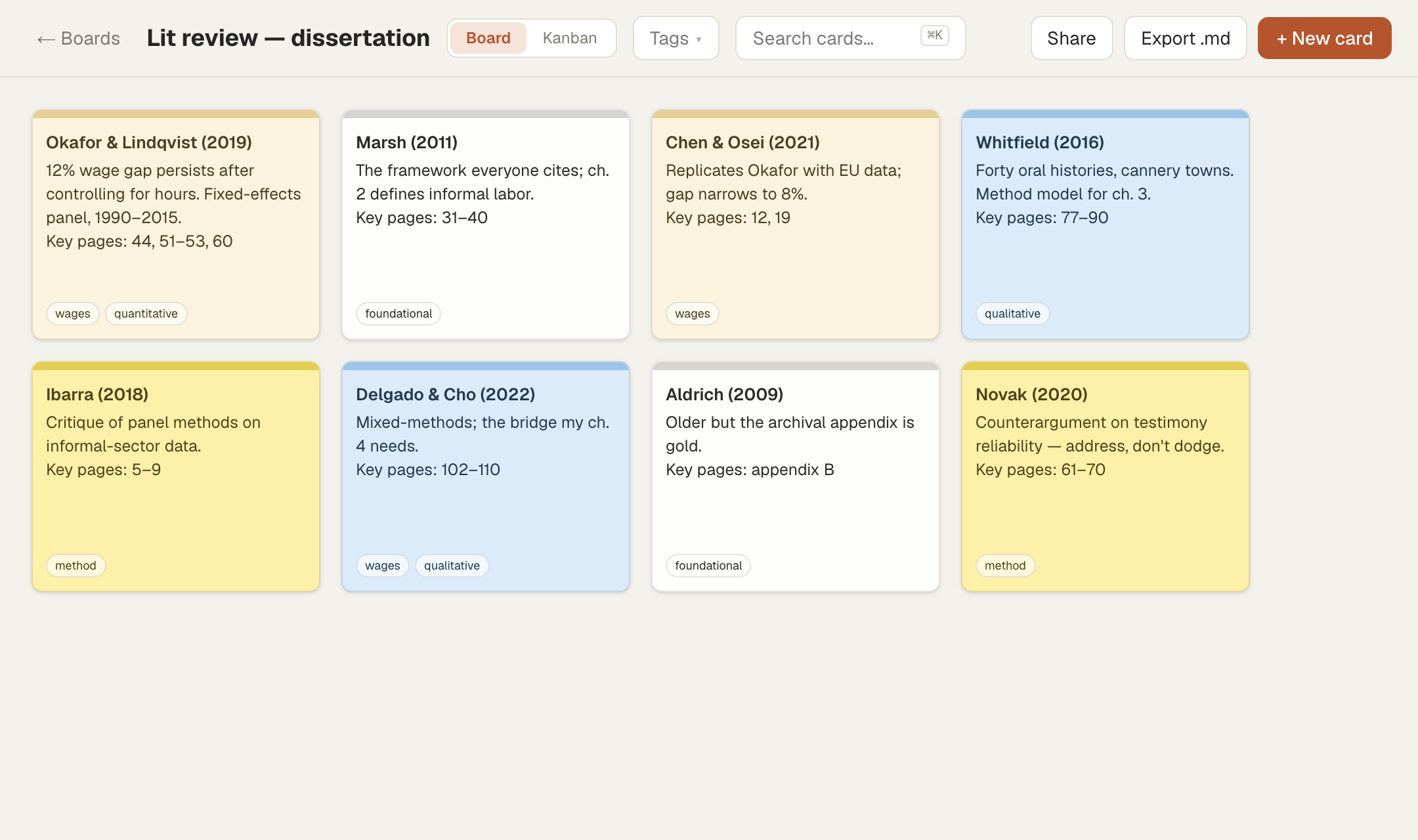
Give your reading its own board, one card per source. Put the citation on the first line, the key finding underneath, and the page references you'll actually need to cite:
Okafor & Lindqvist (2019) Finds a 12% wage gap persists after controlling for hours. Method: fixed-effects panel, 1990–2015. Key pages: 44 (definition), 51–53 (main table), 60 (limitations).
Tag each source by theme and method — #wages, #qualitative, #foundational — then filter the board to see everything you have on one theme at once, which is how a literature review stops being a pile and starts being a map. When you spot a gap in the sources, that gap is your contribution.
Then connect the two boards. From an argument card, use a [[wiki-link]] to point at the sources that support it — type [[Okafor & Lindqvist (2019)]] in the claim card and Cork links them, with backlinks so you can open any source and see every claim it underwrites. When a committee member asks "what's your evidence for that," the answer is one click away.
Reshape your chapters by dragging
Structure changes constantly while you write, and a linear outline makes every change feel like surgery. In Cork's kanban view, make one column per chapter and one card per section. When the structure shifts, drag a section from chapter three into chapter two, or reorder whole chapters by dragging their headers.
Cards can hold checkable task lists, so a section card can track its own state: draft written, sources cited, supervisor's note addressed. You see the whole document's progress as a board instead of a scroll.
Prep for a committee meeting
Before you meet your committee or supervisor, make a board for the conversation. One card per point you need to raise, one per question you expect, one per decision you need from them. Reorder them into the order you want to walk through. Afterward, turn the same board into your action list, and when you need to send the meeting notes along, export it to markdown or share a read-only link.
What Cork is not
Cork organizes your thinking; it does not manage your citations. It is not a reference manager — keep Zotero or your tool of choice for formatting bibliographies and generating in-text citations. Cork holds a citation line the way an index card would, but it won't format a bibliography or track BibTeX.
It's also not a PDF library — you can drop reference images like a figure or a chart into a card, but Cork isn't where you store and annotate the papers themselves. And it's not where you write the actual chapters — there's no long-document editor, no footnotes, no track changes. Plan and organize in Cork; write the prose in your word processor. Your words are yours, and export gets them out whenever you want.
FAQ
Is Cork free for students?
Yes, the free plan gives you 3 boards at no cost and needs no credit card — enough for one thesis (an argument board, a literature-review board, and a chapter board). There is no separate student discount; the free tier is simply free.
Can Cork manage my citations or bibliography?
No. Cork is not a reference manager and does not format citations or generate bibliographies — keep using Zotero or a similar tool for that. Cork holds citation text on cards for planning, but the formatting stays with your citation software.
Can I import my Zotero library or PDFs?
No. Cork does not integrate with Zotero and is not a PDF library. You create source cards in Cork by hand, which keeps the board to the sources you're actively working with rather than your whole collection.
Is 3 boards really enough for a dissertation?
For many people, yes. A common setup is one board for the argument, one for the literature review, and one for chapters — three boards. If you need more, the paid plans start at 19 dollars a year.
Can I write my actual thesis chapters in Cork?
No. Cork is for planning and organizing, not drafting long documents — it has no footnotes, citations, or track changes. Outline and structure in Cork, then write the prose in your word processor and export your board to markdown to guide you.
Does Cork work offline for writing on the go?
Cork installs as an app on desktop and mobile, but it needs an internet connection — there's no offline editing. You can plan comfortably on a laptop or phone, but a flight without wifi isn't the time.
Ready to lay your thesis out where you can see it? The free plan gives you 3 boards and needs no credit card to start — enough to map an entire dissertation before you write a word.