Cork for novelists
Plan your novel on a virtual corkboard of index cards — scene cards, a chapter kanban, a linked character bible, all laid out however makes sense to you.
You have a novel in your head and a scattering of it on paper — a scene you can already hear, three chapters you're sure about, a character whose name keeps changing, and a nagging sense that act two sags. What you don't have is a way to see the whole thing at once and move the pieces around.
That's the job index cards have always done for writers: one scene per card, spread out on a table, shuffled until the order feels right. Cork is that table, minus the part where the cat walks across it. Every scene is a card you can drag, stack, recolor, and link to every other card in the book.
Cork isn't where you draft prose, but it's the best way to figure out what to draft, and in what order.
Lay scenes out by act
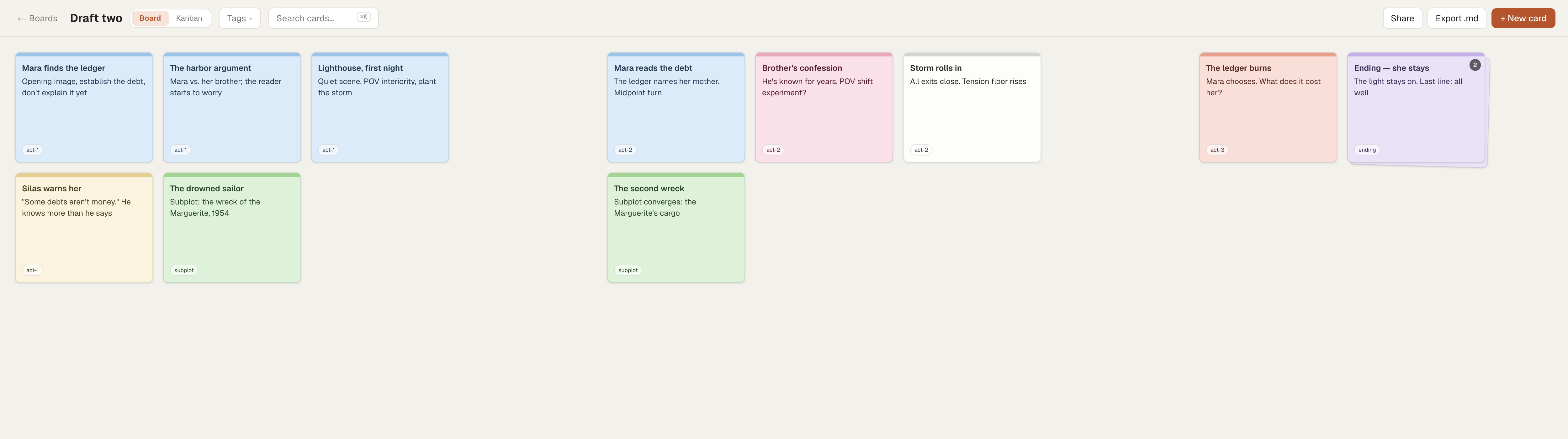
Start on the free-form Board view and give yourself room. Make one card per scene and let the horizontal space stand in for time — act one on the left, act three on the right.
Card titles carry the beat, the body reveals the details:
- "Mara finds the ledger" — opening image, establish the debt, don't explain it yet
- "The harbor argument" — Mara vs. her brother; this is where the reader should start to worry
- "Lighthouse, first night" — quiet scene, POV interiority, plant the storm
Drag cards until the shape feels right. When a scene clearly belongs between two others, drop it on the seam and the neighbors shift over to make room. When you've written three versions of the confrontation and can't yet choose, drop them into a stack — a tidy pile you fan out later. The full walkthrough of arranging and stacking covers the specifics.
Build a chapter kanban
To lay out your story by chapter, flip the same board to Kanban view. Name a column per chapter — "One", "Two", "Three" — and the cards become scenes you slot into place.
This is where structure stops being theoretical. A chapter with seven cards and a chapter with one card are telling you something. Drag a scene from chapter four back to chapter two and watch whether the story survives the move. When two chapters swap places, grab a column by its header and drag the whole thing; every scene inside travels with it.
Keep a character bible that links itself
Make a second board for the people: one card per character, plus cards for places and the handful of objects that matter. "Mara Vane — protagonist", "Silas, the lighthouse keeper", "The ledger", "Gull Point".
Now the two boards start talking. In any scene card, type [[ and Cork offers to link to a character card — even one on the other board. Write [[Silas, the lighthouse keeper]] into three scenes, then open Silas's card and read the Linked from row at the bottom: every scene he appears in, gathered automatically. That's how you answer "wait, when did we last see him?" without searching. If you reference a character you haven't made a card for yet, the link shows dashed. Click it and Cork creates the card on the spot. The wiki-links guide has the details.
Color-code POV and subplots
Cork gives every card a color, and colors are how you make a pattern visible at a glance. Pick a scheme and hold to it — say, blue for Mara's POV, amber for the brother's, green for the drowned-sailor subplot.
Now the sag in act two has a look, not just a feeling: a long amber stretch with no blue in sight means you've left your protagonist in a drawer for four chapters. Add tags on top — #setup, #needs-rewrite, #could-cut — and filter the board down to just the cards wearing one, so a revision pass has a to-do list instead of a vibe.
Revise without retyping
The flexibility of cards makes revisions easy. When a scene needs to move or a chapter needs to be cut, just drag the affected cards and watch your board rearrange itself. Now you can read the new order before committing a single sentence of prose to the change.
When the structure settles, export the board to markdown in one click and use it as the outline you actually draft from. Want a second reader's eyes on the plan? A read-only share link shows them the board without letting them move your furniture.
If it helps to see the whole method start to finish, there's a longer walkthrough on outlining a novel with index cards.
What Cork is not
Cork is for planning your book; it's not where you write it. You'll still draft your prose in Scrivener, Word, Google Docs, or wherever you already work, while Cork acts as your story's map. It won't import a Scrivener project, and it doesn't export to PDF or .docx; the one-click export is markdown.
There are no due dates or reminders, and no real-time co-authoring — Cork is a single-writer planning space, not a shared drafting room. And it needs a connection: there's no offline mode yet. Cork is the best way to lay out your novel and get a clear view of its structure.
FAQ
Can I plan a whole novel on the free plan?
Yes. The free plan gives you 3 boards, which is enough for a scene board, a character bible, and one more — plenty for a single novel. If you run several projects at once, are mapping out a full series, or lean heavily on reference images, the paid plans add boards and storage. See the pricing page for the current tiers.
Do I write the actual manuscript in Cork?
No. Cork is a planning and organizing tool — scene cards, structure, character notes — not a prose editor. You draft the manuscript in whatever writing app you prefer and use Cork to keep the shape of the book in view.
Can I import my existing outline or Scrivener project?
Cork does not import from Scrivener or other apps. You'd recreate your outline as cards, which many writers find is a useful re-read of their own plan. Cork can export boards to markdown in one click when you want to take your structure elsewhere.
How do the character links work across boards?
Type two square brackets in any card and start typing a card's title to link to it, including cards on a different board. Open a linked card and its Linked from row lists every card that points to it, so you can see every scene a character appears in without searching.
What happens when I reorder my chapters?
In kanban view you drag a whole column by its header and every card inside moves with it, so swapping chapter order takes one gesture and no retyping. In either board or kanban view you drag individual scene cards (or stacks of cards) and neighbors shift to make room.
Is my work private?
Yes. Boards are private to your account by default. Nothing is public unless you deliberately create a read-only share link for a specific board, and you can turn that link off whenever you like.
Start free — 3 boards, no credit card. Sign up, make a scene card, and see your novel from above.